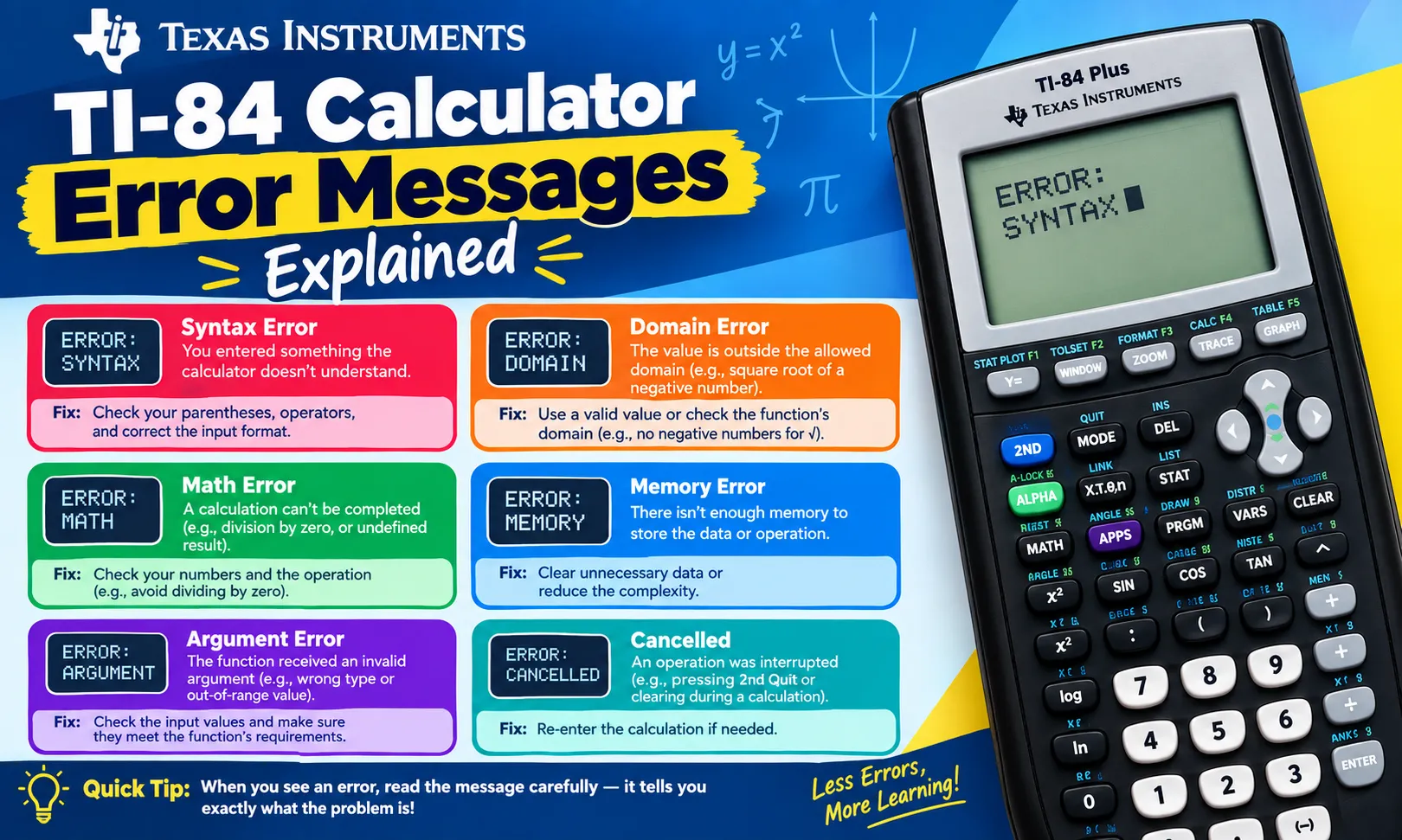
A TI-84 calculator can display an error message when an operation, equation, graph, or program cannot be completed. These messages help identify what went wrong. Common TI-84 errors include ERR:SYNTAX, ERR:DOMAIN, ERR:DIVIDE BY 0, ERR:WINDOW RANGE, and ERR:INVALID DIM.
Most TI-84 errors do not mean that the calculator is damaged. The problem usually comes from an incorrect entry, incompatible setting, missing value, or mathematical operation that the calculator cannot perform. The exact message can also vary slightly between TI-84 models and operating system versions.
This guide explains the most common TI-84 calculator error messages and provides step-by-step solutions.
How to Read a TI-84 Error Message
When the TI-84 detects an error, it normally displays a message such as ERR:SYNTAX or ERR:DOMAIN. The screen may also show 1:Quit and 2:Goto.
The two options have different purposes:
- Quit: Closes the error message and returns you to the previous screen.
- Goto: Takes you back to the location where the calculator detected the problem.
Use Goto when you want to inspect and correct the original entry. Use Quit when you already know the problem or want to cancel the calculation.
ERR:SYNTAX
ERR:SYNTAX means the calculator cannot understand the mathematical expression you entered.
This error commonly occurs because a command, symbol, operator, parenthesis, or function is entered incorrectly.
Common causes
- Missing closing parenthesis
- Extra operators
- Incorrect function format
- Missing multiplication symbol in certain expressions
- Incorrect command placement
- An incomplete equation
Example
Entering an expression such as:
5 + * 3
can produce a syntax error because two operators appear together.
How to fix ERR:SYNTAX
- Select 2:Goto when the error appears.
- Look at the expression around the highlighted location.
- Check all parentheses.
- Check mathematical operators.
- Check functions and commands.
- Correct the expression.
- Press ENTER again.
The Goto option is useful because it takes you directly to the area that caused the error.
ERR:DIVIDE BY 0
ERR:DIVIDE BY 0 appears when the calculator attempts to divide a number by zero.
Division by zero is undefined in standard arithmetic.
Example
25 ÷ 0
The TI-84 cannot calculate this expression and displays the error.
How to fix it
Check the denominator of your calculation.
For example:
25 ÷ (x - 5)
The denominator becomes zero when x = 5. You may need to exclude that value from the calculation or adjust the equation.
For graphing problems, check whether the denominator of a function can become zero within the selected graphing interval.
ERR:DOMAIN
ERR:DOMAIN means that the value entered is outside the allowed domain of a mathematical function.
A mathematical function has specific values that it can accept.
Common examples
The square root function cannot normally accept a negative number in real-number mode.
For example:
√(-9)
can produce a domain-related error when the calculator is operating in real-number mode.
Logarithms also have domain restrictions. The real logarithm of zero or a negative number is undefined.
How to fix ERR:DOMAIN
- Check the number inside the function.
- Determine the allowed domain.
- Check whether the calculator is using real or complex-number mode.
- Correct the input.
- Run the calculation again.
For a square root, make sure the value under the radical is appropriate for the calculator mode.
ERR:ARGUMENT
ERR:ARGUMENT means a function or command received an invalid number or type of argument.
An argument is the information supplied to a function or command.
For example, a function may require one value but receive several values or an incompatible input.
Common causes
- Incorrect number of arguments
- Wrong data type
- Incorrect function format
- Invalid command parameters
How to fix ERR:ARGUMENT
Use Goto to return to the problematic entry. Check the function's required format and enter the correct number and type of arguments.
The TI-84's built-in catalog can help you insert commands in the correct format.
ERR:INVALID DIM
ERR:INVALID DIM is common when working with lists or matrices.
The error means that the dimensions or sizes of the data do not match the operation you are attempting.
Matrix example
Matrix operations require compatible dimensions. A matrix multiplication operation requires the number of columns in the first matrix to match the number of rows in the second matrix.
List example
A statistical calculation may also produce an invalid-dimension error when related lists do not contain compatible amounts of data.
How to fix it
- Open the relevant lists or matrices.
- Check their dimensions.
- Remove unwanted entries if necessary.
- Make the dimensions compatible.
- Run the calculation again.
For matrices, check the row and column counts before performing an operation.
ERR:WINDOW RANGE
ERR:WINDOW RANGE usually occurs when the graphing window contains invalid or incompatible settings.
The TI-84 uses settings such as:
- Xmin
- Xmax
- Xscl
- Ymin
- Ymax
- Yscl
The calculator needs appropriate minimum and maximum values to create a graph.
Common causes
- Xmin is greater than or equal to Xmax
- Ymin is greater than or equal to Ymax
- Invalid scale settings
- Extremely large or small window values
How to fix ERR:WINDOW RANGE
- Press WINDOW.
- Check Xmin and Xmax.
- Make sure Xmin is smaller than Xmax.
- Check Ymin and Ymax.
- Make sure Ymin is smaller than Ymax.
- Check the scale values.
- Press GRAPH.
You can also press ZOOM and select 6:ZStandard to restore a standard graphing window.
ERR:INVALID
ERR:INVALID indicates that the calculator cannot use the selected value or operation in the current situation.
This message can appear with different calculator functions. The exact cause depends on what you were doing when the error occurred.
How to fix it
Select Goto and inspect the expression. Check the input values, function settings, and command format.
If the problem involves a graph, check the graphing mode and window settings. If the problem involves statistics, check the lists and data values.
ERR:STAT
ERR:STAT usually indicates a problem with a statistical calculation or statistical data.
Common causes include:
- Invalid statistical data
- Empty lists
- Incorrect list configuration
- Incompatible list sizes
- Invalid regression settings
How to fix ERR:STAT
- Press STAT.
- Select 1:Edit.
- Check the lists used in the calculation.
- Confirm that the lists contain valid data.
- Check that paired data lists have matching lengths.
- Return to the statistical calculation.
- Run it again.
Also check whether you accidentally selected an empty list.
ERR:DATA TYPE
ERR:DATA TYPE occurs when the calculator receives a type of data that the selected operation cannot process.
For example, a command may require a number but receive a list, matrix, or other type of data.
How to fix it
Check the data used in the expression. Make sure the function receives the correct type of input.
If you are working with lists, matrices, or statistical functions, verify that the selected command supports that type of data.
ERR:MEMORY
A memory-related error occurs when the TI-84 does not have enough available memory for the requested operation.
Programs, lists, variables, applications, and other stored data can use calculator memory.
How to fix memory errors
- Press 2nd.
- Press + to open the MEM menu.
- Select 2:Mem Mgmt/Del.
- Review the stored items.
- Delete unnecessary programs, variables, or applications.
- Try the operation again.
Do not delete important programs or data unless you have a backup.
ERR:NO SIGN CHNG
ERR:NO SIGN CHNG can occur with certain numerical equation-solving functions when the calculator cannot find the expected sign change within the specified interval.
The calculator may require the function to have different signs at the boundaries of the selected interval.
How to fix it
Check the lower and upper bounds you entered. Try an interval where the function changes from positive to negative or from negative to positive.
For equation-solving problems, graphing the function first can help identify an appropriate interval.
ERR:SOLVER
ERR:SOLVER can occur when the equation solver cannot find a suitable solution using the information provided.
Possible causes include:
- Incorrect equation
- Poor starting value
- Invalid bounds
- No solution within the selected range
- Multiple mathematical issues in the equation
How to fix it
Check the equation carefully. Enter a reasonable starting value. If bounds are available, use values that contain the expected solution.
Graphing the equation can also help identify an appropriate starting point.
How to Prevent TI-84 Errors
You can reduce calculator errors by checking your entries before pressing ENTER.
Follow these practices:
- Use parentheses when needed.
- Check negative numbers carefully.
- Verify function domains.
- Check matrix dimensions before calculations.
- Confirm statistical lists contain valid data.
- Check graphing window values.
- Keep enough free calculator memory.
- Use the built-in Catalog for unfamiliar commands.
- Check calculator modes before advanced calculations.
- Review the original expression when an error appears.
When to Reset a TI-84 Calculator
You usually do not need to reset the entire calculator for a mathematical error. Most errors result from the current calculation or settings.
If repeated problems are caused by incorrect settings, you can reset selected settings instead of immediately clearing all calculator memory.
Before deleting programs, variables, or applications, make sure important information is backed up.
Frequently Asked Questions
What does ERR:SYNTAX mean on a TI-84?
ERR:SYNTAX means the calculator cannot interpret the expression because the entered command or mathematical format is incorrect.
What does ERR:DOMAIN mean on a TI-84?
ERR:DOMAIN means the entered value is outside the allowed domain of the selected mathematical function.
How do I fix ERR:WINDOW RANGE?
Press WINDOW and check that Xmin is smaller than Xmax and Ymin is smaller than Ymax. You can also use ZOOM → 6:ZStandard to restore standard graph settings.
Why does my TI-84 say ERR:DIVIDE BY 0?
The calculator is attempting to divide a value by zero. Check the denominator and remove the input that makes the denominator equal to zero.
What does ERR:INVALID DIM mean?
ERR:INVALID DIM usually means that list or matrix dimensions are incompatible with the selected operation.
Should I reset my TI-84 when an error appears?
No. A full reset is usually unnecessary. First identify the specific error and correct the expression, data, mode, or setting that caused it.
🧮 Try the TI-84 Calculator Online — It's Free!
Put your knowledge to practice with our free browser-based TI-84 Plus CE emulator. No downloads, no sign-up required.
Open Calculator →